

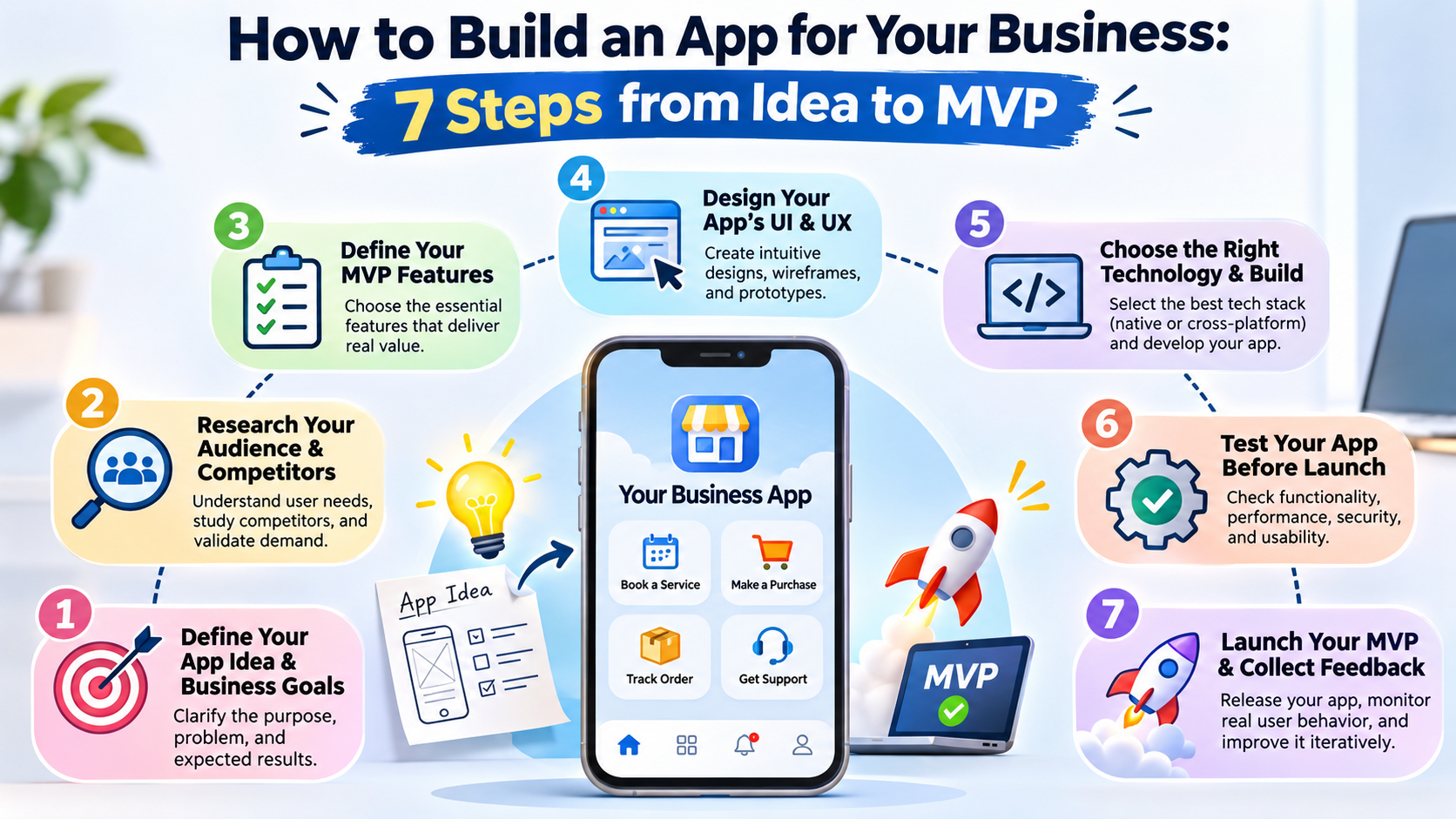
Why Your Business Needs a Mobile App
Imagine your customers could browse your products, book appointments, track deliveries, communicate with your team, or purchase services without visiting your physical location or opening a web browser. That's the convenience a well-designed mobile application can deliver. For many businesses, a mobile app is no longer simply another digital marketing channel. It can become a practical tool for improving customer relationships, simplifying operations, and creating new revenue opportunities.
However, not every business needs an app immediately. If customers only visit your website occasionally to find opening hours or contact information, a responsive website might be sufficient. A mobile app becomes particularly valuable when customers repeatedly interact with your business, require personalized experiences, or benefit from features such as push notifications, location services, saved preferences, and offline access.
Consider a restaurant that accepts orders through phone calls and messaging applications. Staff members must manually confirm orders, calculate totals, and communicate delivery details. A dedicated restaurant app could automate much of that process while giving customers a convenient ordering experience. Similarly, a healthcare provider might use an application to manage appointments, send reminders, and provide secure access to relevant patient information.
The real advantage of business mobile app development is not simply having your company logo on someone's smartphone. It is creating a digital experience that makes a valuable task easier, faster, or more reliable.
A successful app can support several business objectives:
Customer engagement: Give customers a convenient way to interact with your business.
Operational efficiency: Automate repetitive workflows and reduce manual administration.
Revenue generation: Enable bookings, purchases, subscriptions, or service requests.
Customer retention: Encourage repeat interactions through useful personalized experiences.
Business intelligence: Understand how customers use your services through responsible analytics.
The challenge is turning an initial concept into something people genuinely want to use. That's where a structured mobile app development process becomes essential.
Instead of investing heavily in a complicated application from the beginning, businesses can start with a Minimum Viable Product (MVP). An MVP includes the essential functionality needed to solve a specific customer problem and test important business assumptions with real users.
The following seven steps explain how to move from an initial business idea to a working MVP without losing control of your budget, timeline, or product direction.
Step 1: Define Your App Idea and Business Goals
Every successful mobile application begins with a clearly defined purpose. Before hiring developers, choosing programming languages, or designing screens, you need to understand exactly what your application should accomplish. This sounds obvious, but many businesses begin development with a collection of features rather than a clearly articulated problem.
For example, a business owner might say, "I want an app with customer accounts, notifications, online payments, chat, and an admin dashboard." Those features could be useful, but they don't explain why the app should exist. A better starting point would be, "I want customers to book our services in less than two minutes without calling our office."
The second statement gives the development team a measurable objective. It also helps distinguish essential functionality from features that can wait until later.
Your app idea should connect directly to a business outcome. An e-commerce application might aim to increase repeat purchases, while a transportation app could focus on reducing booking delays. A business management application might help employees complete administrative tasks with fewer errors.
When defining your app, consider the people who will use it, the tasks they need to complete, and the results your business expects. You should also determine whether your application will serve customers, employees, business partners, or multiple user groups.
Identify the Problem Your App Will Solve
The most useful question during this stage is simple: What problem will customers solve by using this app?
Suppose you operate a home maintenance company. Customers currently call your office, explain their problems, wait for availability confirmation, and arrange payment separately. Your application could combine those activities into one streamlined experience.
The initial version might allow customers to select a service, choose an available appointment, confirm a booking, and receive status updates. Those features directly address the problem of complicated scheduling.
Now imagine adding an AI chatbot, loyalty program, social community, and advanced reporting dashboard before launching. These additions might eventually become useful, but they could also delay the core booking experience.
A practical way to define your concept is to write a short product statement:
Our app helps [target audience] solve [specific problem] by providing [core solution].
For example:
"Our mobile app helps busy homeowners book trusted maintenance professionals through a simple scheduling and service-tracking platform."
Once you have this statement, define two or three measurable goals. You might aim for 100 completed bookings during the first month, a booking completion rate above 60%, or a reduction in customer support calls.
These are illustrative targets, not universal benchmarks. Your actual targets should reflect your market, customer acquisition strategy, and existing business performance.
Key takeaway: Define the business problem before defining the app's features.
Step 2: Research Your Target Audience and Competitors
You may believe your app idea is excellent, but your customers are the ones who will determine whether it succeeds. That's why market research is an essential part of building an app for your business. It helps you understand customer expectations, identify competitors, and avoid spending money on features nobody needs.
Start by defining your ideal users. Consider their age range, professional background, location, technical experience, purchasing habits, and common frustrations. For a business-to-business application, you may also need to understand company size, employee responsibilities, procurement processes, and approval requirements.
For example, an appointment-booking app designed for busy professionals should emphasize speed and convenience. A business management application used by warehouse employees may need larger controls, barcode scanning, and reliable performance in environments with unstable internet connections.
Your research should examine both direct and indirect competitors. Direct competitors offer similar applications to the same audience, while indirect competitors solve the same problem through different methods. A restaurant ordering app competes not only with other ordering applications but also with phone ordering, messaging platforms, and existing delivery marketplaces.
Study competitors' app store reviews, onboarding processes, pricing structures, and customer complaints. Look for recurring frustrations rather than assuming that every negative review represents a market opportunity.
Validate Your App Idea Before Development
App idea validation means collecting evidence that potential customers experience the problem and are willing to adopt your proposed solution.
One of the most effective approaches is speaking directly with prospective users. Instead of asking whether they like your app idea, ask how they currently complete the relevant task, what frustrates them, and what alternatives they have already tried.
You can also test demand through a landing page, interactive prototype, manual service, or small pilot program. These methods often reveal important insights before development begins.
For instance, imagine planning a mobile application that helps users discover international conferences and exhibitions. Before building a large global event database, you could create a simple landing page featuring searchable events in a few popular categories. By observing which categories attract interest and which search filters users request, you can make more informed decisions about the eventual application.
A useful validation process includes customer interviews, competitor analysis, prototype testing, and a clear assessment of how the app could generate or support revenue.
Be cautious about relying exclusively on surveys. People sometimes express enthusiasm for products they never intend to use. Behavioral evidence, such as completed bookings, paid pilot participation, or repeated prototype usage, is generally more meaningful than compliments.
Key takeaway: Validate customer demand before committing to full-scale development.
Step 3: Define Your MVP Features and Requirements
Once your business idea has been validated, the next step is determining what the first version of your application should include. This is where MVP app development becomes particularly valuable.
A Minimum Viable Product is not simply an unfinished application or a collection of poorly implemented features. It is the smallest usable version of a product that delivers meaningful value while allowing you to learn from real customers.
Think of an MVP as the foundation of a building. You don't need to construct every room immediately, but the foundation must be strong enough to support future expansion. Similarly, your initial application should deliver its core functionality reliably without requiring every feature from your long-term product roadmap.
Consider an e-commerce business planning a mobile shopping application. Its initial requirements might include product listings, product details, shopping carts, checkout, order confirmation, and basic order management. Features such as personalized AI recommendations, complex loyalty programs, and advanced customer segmentation could be introduced later.
The goal is to create a complete customer journey rather than an impressive but disconnected collection of screens.
Prioritize Must-Have Features Over Nice-to-Have Features
Feature prioritization helps protect your budget and keeps the development team focused. One commonly used method is MoSCoW prioritization, which divides requirements into must-have, should-have, could-have, and won't-have-for-now categories.
For a basic appointment-booking application, the feature plan might look like this:
Feature | Priority | MVP Decision |
Customer registration | Must-have if accounts are necessary | Include |
Service listings | Must-have | Include |
Appointment scheduling | Must-have | Include |
Booking confirmation | Must-have | Include |
Basic admin dashboard | Must-have | Include |
Online payments | Depends on business model | Evaluate |
Push notifications | Should-have | Consider |
Customer reviews | Could-have | Later |
AI recommendations | Could-have | Later |
Advanced loyalty program | Won't-have-for-now | Future release |
This exercise helps everyone involved understand what success looks like for the initial release.
You should also document functional and non-functional requirements. Functional requirements describe what the application does, such as creating bookings or processing payments. Non-functional requirements describe how the application should behave, including security, accessibility, performance, reliability, and maintainability.
For example, your booking system should prevent two customers from reserving the same appointment slot. Your authentication system should protect customer accounts, and your application should handle temporary network interruptions gracefully.
Creating a concise Software Requirements Specification (SRS) or Product Requirements Document (PRD) can reduce misunderstandings between business owners, designers, and developers.
Key takeaway: Build the smallest complete solution that delivers measurable customer value.
Step 4: Design Your App's UI and UX
After defining the MVP requirements, it's time to translate your concept into an experience users can understand. This stage involves User Interface (UI) design and User Experience (UX) design.
Although the terms are often used together, they describe different aspects of an application. UI design focuses on visual elements such as buttons, typography, icons, spacing, and colors. UX design focuses on how users navigate the application and complete their intended tasks.
An application can look beautiful while still being frustrating to use. Imagine a shopping app with elegant animations and attractive product photography, but customers must navigate through eight screens to complete checkout. The visual design may be impressive, yet the experience creates unnecessary friction.
Good UX design removes obstacles. It makes important actions easy to find, presents information clearly, and provides helpful feedback when something happens.
For a business application, design decisions should reflect the user's actual environment. A delivery driver may need large touch targets and simple navigation, while an accounting professional may prioritize clear data tables and efficient filtering.
Consistency is equally important. Buttons, form fields, navigation patterns, and error messages should behave predictably throughout the application.
Create Wireframes and Interactive Prototypes
Wireframes are simplified layouts that show the structure of individual application screens. They help designers and stakeholders agree on navigation, content hierarchy, and functionality before detailed visual design begins.
For example, a booking application might require a home screen, service listing, service details, date selection, booking confirmation, and customer profile. Wireframes reveal how these screens connect and whether users can complete the booking process efficiently.
After approving the wireframes, designers can create high-fidelity interfaces using tools such as Figma. These designs introduce brand colors, typography, imagery, icons, and reusable components.
An interactive prototype goes one step further by simulating navigation between screens. Stakeholders can click through the proposed application and identify confusing interactions before development begins.
Prototype testing is particularly valuable because changing a screen design is usually less expensive than rewriting completed application functionality.
Accessibility should also be considered during design. Use readable typography, sufficient color contrast, descriptive labels, and navigation patterns that work with assistive technologies.
Key takeaway: Design the customer journey before writing the application code.
Step 5: Choose the Right Technology and Build Your App
Technology selection influences development costs, application performance, maintenance requirements, and future scalability. However, the best technology is not necessarily the newest or most popular framework. It is the one that fits your product requirements, available expertise, and long-term business goals.
For mobile applications, businesses commonly choose between native development and cross-platform development. Native applications are built specifically for Android or iOS, while cross-platform frameworks allow developers to share substantial portions of the codebase across operating systems.
Popular development options include Kotlin for Android, Swift for iOS, Flutter, and React Native. Each approach has advantages and trade-offs.
Your application may also require a backend system responsible for user authentication, business logic, databases, notifications, payments, and administrative operations. Depending on the project, suitable backend technologies might include Laravel, Node.js, ASP.NET Core, or other established frameworks.
A business app should be designed with clear separation between its user interface, application logic, and data management. Google's Android architecture guidance recommends separating responsibilities into layers to improve maintainability, testing, and scalability.
Android Developers+1
Native vs. Cross-Platform App Development
The following comparison can help business owners understand the main differences.
Factor | Native Development | Cross-Platform Development |
Platforms | Separate Android and iOS implementations | Shared code across platforms |
Common technologies | Kotlin, Swift | Flutter, React Native |
Development effort | Often higher for two platforms | Often lower for shared functionality |
Performance | Direct platform integration | Strong for many business applications |
Platform-specific features | Direct access | May require native integrations |
Maintenance | Separate platform codebases | More shared maintenance |
Best suited for | Deep platform integration and specialized requirements | Many business apps and MVPs |
For businesses planning to release on both Android and iOS, Flutter app development can be an attractive option. Flutter supports a shared application codebase and provides tools for creating consistent interfaces across platforms.
However, cross-platform development does not eliminate every platform-specific task. App permissions, native integrations, operating-system behavior, store submission, and device testing may still require separate attention.
The backend architecture deserves equal consideration. A typical application might communicate with a REST API that handles business rules and accesses a relational database such as MySQL or PostgreSQL.
For example, a service-booking application could use Flutter for the mobile interface, PHP or Laravel for the backend, MySQL for structured data, and an administrative dashboard for managing bookings and customers.
Security must be built into the development process. Use encrypted network connections, secure authentication, authorization checks, validated inputs, appropriate secret management, and established payment integrations.
Avoid storing sensitive credentials directly inside mobile application code. Because users can inspect distributed applications, security-sensitive operations should be enforced on trusted backend systems.
Key takeaway: Choose a maintainable technology stack that supports your MVP and future product growth.
Step 6: Test Your App Before Launch
Developing an application is only part of the journey. Before customers begin using it, you need to verify that its features work correctly and that the experience remains reliable under realistic conditions.
Testing should not be treated as a final activity performed after every feature is complete. A more effective approach is to test continuously throughout development, identifying problems while they are still relatively inexpensive to resolve.
For example, imagine a customer successfully creates an account, selects a service, and enters payment information, only to encounter an error on the confirmation screen. Even if the rest of the application works perfectly, that failure could damage customer trust and result in lost revenue.
Testing helps identify these problems before they affect a larger audience.
You should evaluate the application on different screen sizes, operating-system versions, and network conditions. An app that works perfectly on a developer's computer or simulator may behave differently on an older smartphone with limited memory.
Testing should also cover unusual situations. What happens when the internet disconnects during checkout? Can customers accidentally submit the same booking twice? Does the application handle incorrect passwords and expired sessions appropriately?
Functional, Performance, Security, and Usability Testing
A comprehensive testing strategy includes several complementary activities.
Functional testing verifies that individual features behave according to their requirements. Registration, login, search, booking, payment, and administrative operations should all be tested.
Performance testing evaluates responsiveness, resource consumption, and backend behavior under expected traffic. A small MVP does not necessarily require expensive load-testing infrastructure, but its critical operations should perform reliably.
Security testing examines authentication, authorization, data handling, API endpoints, and potential vulnerabilities. Applications processing financial, healthcare, or other sensitive information may require additional controls and specialized assessments.
Usability testing observes whether real users can complete important tasks without unnecessary confusion. Watching someone struggle with a screen often reveals more than asking whether they like its design.
Compatibility testing checks the application across supported devices and operating-system versions.
Businesses should also conduct User Acceptance Testing (UAT), where stakeholders confirm that the completed application meets the agreed business requirements.
For Android distribution, Google Play provides internal, closed, and open testing tracks. As of November 2026, newly created personal developer accounts covered by Google's testing policy must complete a closed test with at least 12 opted-in testers for 14 consecutive days before applying for production access.
Play Console Help+1
For iOS, Apple's TestFlight platform supports beta distribution before a public App Store release. Apple also requires submitted applications to be sufficiently complete, functional, and compliant with its review guidelines.
Apple Developer+1
Key takeaway: Test the complete user journey, not just individual screens.
Step 7: Launch Your MVP and Collect User Feedback
Launching your application is an important milestone, but it is not the end of the product development process. In many ways, it is the beginning of the most valuable learning stage.
Until real customers begin using your app, many assumptions about user behavior remain untested. You may believe that customers will frequently use a particular feature, only to discover that they prefer a simpler alternative. You might also find that users encounter problems your development team never anticipated.
A successful MVP launch should therefore be treated as a controlled learning opportunity.
Before release, prepare the necessary app store assets, including your application name, icon, screenshots, description, privacy policy, and support information. You should also verify that backend services are operational and that customers can contact your business when they need assistance.
For Apple App Store submissions, review the latest App Review Guidelines. Apple requires accurate metadata, appropriate privacy disclosures, and working functionality. Apps offering account creation generally must also support account deletion within the application.
Apple Developer+1
Once the app is available to users, monitor product metrics that relate directly to your business objectives. Downloads can indicate interest, but they don't necessarily demonstrate that customers receive value.
More useful metrics may include activation rate, completed bookings, purchase conversion, repeat usage, customer retention, and revenue per active customer.
Suppose 1,000 people install your app, but only 40 complete the primary action. That suggests an activation rate of 4%, assuming each installation represents a distinct user and the primary action defines activation. Rather than immediately spending more on advertising, investigate why users abandon the process.
Analytics, customer interviews, support requests, and app store feedback can help identify improvement opportunities.
Your development team should then prioritize updates based on customer impact, business value, technical risk, and implementation effort.
Key takeaway: Launch to learn, measure actual customer behavior, and improve the product continuously.
How Much Does It Cost to Build a Business App?
One of the most common questions business owners ask is, "How much does it cost to build an app?"
The answer depends on the application's complexity, required platforms, design expectations, integrations, security requirements, and development team's location and experience.
A simple application with basic authentication, content management, and a limited number of screens will generally require less development effort than a multi-role marketplace with real-time tracking, payments, messaging, and complex administrative workflows.
The following figures are illustrative planning ranges in US dollars, not verified market averages or fixed quotations.
App Type | Illustrative Development Budget | Typical Scope |
Basic business MVP | $5,000–$15,000 | Core screens, simple backend, basic administration |
Standard business application | $15,000–$40,000 | Accounts, booking or commerce, APIs, dashboard |
Advanced mobile application | $40,000–$100,000 | Multiple user roles, integrations, advanced workflows |
Enterprise-grade platform | $100,000+ | Complex architecture, compliance, integrations, scalability |
Actual proposals can fall substantially outside these ranges. A tightly scoped application built by a small team may cost less, while regulated applications or projects requiring extensive integrations can cost considerably more.
You should also budget for expenses beyond initial development. These may include hosting, domain services, cloud storage, payment processing, third-party APIs, developer accounts, monitoring, security assessments, maintenance, and customer support.
The most effective way to control mobile app development costs is to define requirements carefully and avoid unnecessary features during the MVP stage.
A fixed-price project can work well when the scope is clear and stable. A time-and-materials arrangement may be more suitable when requirements are expected to evolve through research and user feedback.
When comparing development quotations, evaluate the deliverables rather than looking exclusively at the total price. Confirm whether UI/UX design, source code, backend development, testing, deployment, documentation, and post-launch support are included.
A low initial quotation can become expensive if essential services are excluded or the application requires substantial rework.
How Long Does It Take to Develop an MVP?
The timeline for MVP mobile app development varies according to product complexity, team availability, integrations, and approval requirements.
For a relatively straightforward business application, an initial MVP may be developed within approximately 8–16 weeks. More complicated products can take considerably longer, particularly when they require multiple user roles, payment systems, external integrations, or specialized security controls.
A sample 12-week development schedule might look like this:
Phase | Estimated Duration | Main Deliverable |
Discovery and planning | 1–2 weeks | Product requirements and MVP scope |
UI/UX design | 2 weeks | Wireframes and approved designs |
Backend and mobile development | 4–5 weeks | Working application |
Quality assurance | 2 weeks | Tested release candidate |
Beta launch and refinement | 1–2 weeks | MVP ready for initial users |
Some activities can overlap. For example, backend architecture can begin while designers finalize certain screens, and automated testing can run throughout development.
These durations are estimates rather than guarantees. App store review, policy requirements, external approvals, and unexpected technical issues can affect the launch date.
The development timeline also depends on how quickly business stakeholders provide feedback. When design approvals or requirements decisions take several weeks, even an experienced development team may struggle to maintain the original schedule.
A practical approach is to organize work into short development cycles with clearly defined deliverables. Each cycle should produce something that can be reviewed, tested, or demonstrated.
This makes progress easier to measure and allows problems to be identified before they threaten the entire project.
Common Mistakes to Avoid When Building a Business App
Building an application involves dozens of decisions, and some mistakes can create expensive problems long after the initial launch.
One of the most common mistakes is trying to build too many features at once. Business owners often compare their initial product with established applications that have benefited from years of development. Attempting to reproduce every feature immediately can increase costs and delay validation.
Another mistake is skipping customer research. Without understanding your audience, you risk building an application that solves an internal business assumption rather than an actual customer problem.
Poor UI/UX planning can also undermine otherwise strong functionality. Customers generally don't care how sophisticated your backend architecture is if they cannot easily complete a booking or purchase.
Choosing technology solely because it is fashionable is another avoidable problem. Framework selection should reflect the application's requirements, available expertise, integration needs, and maintenance expectations.
Businesses also sometimes underestimate backend development. A polished mobile interface still needs reliable APIs, secure data handling, administrative tools, and appropriate infrastructure.
Ignoring security and privacy requirements can lead to serious consequences, including data exposure, customer distrust, regulatory problems, and app store rejection.
A further mistake is treating launch as the final deliverable. Applications require ongoing maintenance because operating systems, third-party services, customer expectations, and security threats continue to change.
Finally, avoid measuring success exclusively through downloads. An app with thousands of installations but almost no meaningful engagement may deliver less business value than a smaller application used consistently by loyal customers.
The most successful development approach combines clear objectives, focused functionality, thoughtful design, reliable engineering, and continuous improvement.
Conclusion
Learning how to build an app for your business does not require becoming a software engineer. It requires understanding your customers, defining a meaningful business problem, and following a structured development process.
The seven steps provide a practical roadmap: define your idea, research your audience, prioritize MVP features, design the user experience, choose suitable technology, test the application, and launch with a plan for collecting feedback.
The most important principle is to start with value rather than complexity. A simple application that reliably solves a customer problem can provide a stronger foundation than an expensive product filled with unnecessary features.
By investing in proper planning, selecting an appropriate development approach, and treating the MVP as a learning opportunity, businesses can reduce avoidable risks and make more informed technology investments.
Whether you're creating an e-commerce application, booking platform, customer portal, or internal management system, the objective remains the same: build something useful, validate it with real users, and improve it based on evidence.
Frequently Asked Questions (FAQs)
1. Can I build a business app without coding experience?
Yes. Business owners can use no-code platforms, hire freelance developers, or work with a professional app development agency. The right option depends on the application's complexity, required integrations, budget, and long-term maintenance needs. No-code tools can be suitable for simple workflows and early prototypes, while custom development provides greater flexibility for specialized business requirements. Even without coding knowledge, you should understand your app's purpose, features, target audience, and expected business outcomes.
2. What is the difference between an MVP and a full mobile application?
An MVP contains the minimum functionality needed to deliver meaningful value and validate important assumptions with real users. A full product generally includes a broader range of features, integrations, administrative capabilities, and refinements developed over time. However, an MVP should still be secure, reliable, and usable within its intended scope. The difference is primarily about feature scope and learning objectives, not whether the application meets basic quality standards.
3. Should I develop an Android app or an iOS app first?
The decision should depend on your target audience, business model, and available budget. If most potential customers use Android devices, Android-first development may be appropriate. If your target customers primarily use iPhones, iOS may deserve priority. Businesses targeting both platforms can consider cross-platform technologies such as Flutter or React Native. Audience research and customer device data should guide the decision rather than assumptions about which platform is more popular.
4. How can I reduce the cost of developing a mobile app?
Start by defining a narrow MVP scope and prioritizing essential customer journeys. Validate your idea before development, use reusable components, avoid unnecessary custom integrations, and choose technologies appropriate for your requirements. Clear documentation and timely feedback can also reduce expensive revisions. However, cutting essential testing, security, or maintenance work simply to reduce the initial quotation can create larger costs later.
5. What should I do after launching my business app?
After launch, monitor crashes, customer feedback, user activation, retention, and the completion of important business actions. Identify where customers encounter difficulties and prioritize improvements according to their impact. Maintain the application through security updates, operating-system compatibility testing, and backend monitoring. Introduce new features only when research or usage data supports their value. A successful app should evolve with its customers rather than remain unchanged after its first release.
Have a question or a different perspective? Share it below.